Bonus: Native Deployment — Running CartPilot Without Any Proprietary Cloud
Deploy ADK 2 agents completely self-hosted with Docker, Postgres DatabaseSessionService, Caddy HTTPS, Jaeger tracing, and Loki logging.
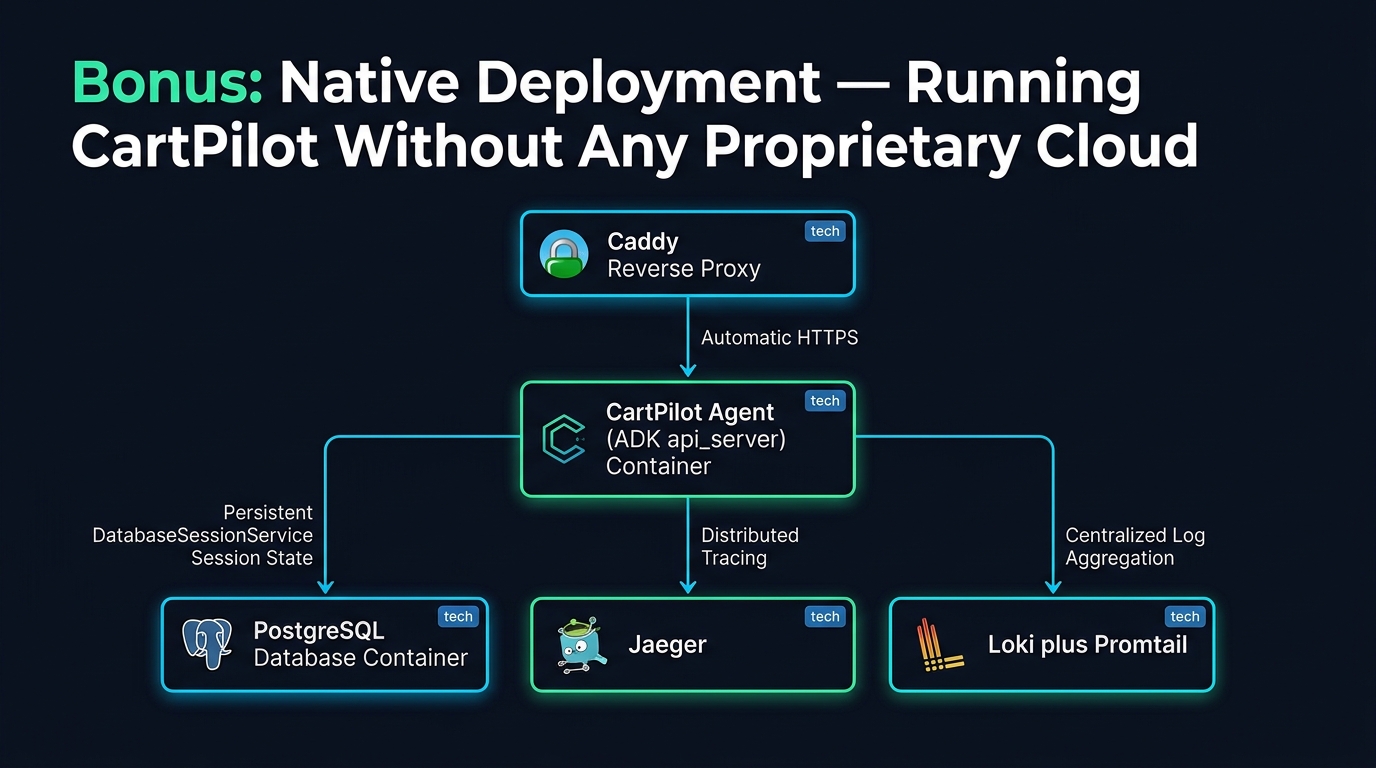
Bonus: Native Deployment — Running CartPilot Without Any Proprietary Cloud
📦 Companion Code: View the complete, runnable code on GitHub:
part18in the cartpilot-adk2-series repository.
Part 14 shipped CartPilot to Cloud Run and Agent Runtime — the fastest path to production, and a reasonable default for most teams. But "fastest" isn't "only," and plenty of good reasons point the other way: data residency requirements, air-gapped or on-prem environments, avoiding vendor lock-in, or simply wanting full control of the stack on hardware you already own. This part rebuilds CartPilot's production deployment using nothing but open-source software you run yourself: Docker, Postgres, Caddy, Jaeger, and Loki — no Cloud Run, no managed database, no vendor observability platform.
What "native" means here, precisely
One distinction matters before anything else: which model answers CartPilot's questions is a separate decision from where CartPilot's infrastructure runs. Calling the Gemini, OpenAI, or Anthropic API is a model API call, not an infrastructure dependency — you can run every piece of this deployment on your own hardware and still call a cloud model API from it. If you want the model layer non-proprietary too, pair this part with Part 15: run a local Ollama model and CartPilot has zero external network dependencies at all, top to bottom. This part focuses purely on the infrastructure layer — hosting, session storage, reverse proxy, observability — replacing every managed cloud service from Part 14 with a self-hosted, open-source equivalent.
The stack
caddy (reverse proxy, automatic HTTPS via Let's Encrypt)
             |
        cartpilot (adk api_server — the same agent code from Parts 1-13)
             |
        postgres (persistent session storage — replaces InMemorySessionService)

        jaeger    <- traces, native OTLP support, own web UI
        loki      <- logs, fed by promtail reading cartpilot's stdout
Six containers, one docker-compose.yml, one VM (or a handful, once you outgrow one).
Persistent sessions: self-hosted Postgres, zero custom code
Every part of this series so far used InMemorySessionService — fine for development, useless in production, since a restart wipes every shopper's cart and conversation. ADK's DatabaseSessionService (SQLAlchemy-backed, supporting Postgres, MySQL, and SQLite) is the production answer, and — usefully — you don't need to write a line of Python to wire it up: adk api_server accepts a --session_service_uri flag directly.
# Dockerfile
FROM python:3.13-slim

WORKDIR /app

COPY requirements.txt .
RUN pip install --no-cache-dir -r requirements.txt

RUN adduser --disabled-password --gecos "" cartpilot && \
    chown -R cartpilot:cartpilot /app
COPY . .
USER cartpilot

ENV PATH="/home/cartpilot/.local/bin:$PATH"
EXPOSE 8000

# --session_service_uri points ADK's own DatabaseSessionService at our
# self-hosted Postgres container — no InMemorySessionService, no
# managed cloud database. --no-reload disables the dev auto-reloader,
# which has no place in a long-running container.
CMD ["sh", "-c", "adk api_server --host 0.0.0.0 --port 8000 --session_service_uri \"$SESSION_DB_URL\" --no-reload cartpilot"]# docker-compose.yml
services:
cartpilot:
build: .
restart: unless-stopped
env_file: .env
environment:
- SESSION_DB_URL=${SESSION_DB_URL}
- OTEL_EXPORTER_OTLP_ENDPOINT=${OTEL_EXPORTER_OTLP_ENDPOINT}
- OTEL_SERVICE_NAME=${OTEL_SERVICE_NAME}
depends_on:
postgres:
condition: service_healthy
logging:
driver: json-file
options:
max-size: "10m"
max-file: "5"
expose:
- "8000"
postgres:
image: postgres:16-alpine
restart: unless-stopped
environment:
- POSTGRES_USER=${POSTGRES_USER}
- POSTGRES_PASSWORD=${POSTGRES_PASSWORD}
- POSTGRES_DB=${POSTGRES_DB}
volumes:
- postgres_data:/var/lib/postgresql/data
healthcheck:
test: ["CMD-SHELL", "pg_isready -U ${POSTGRES_USER} -d ${POSTGRES_DB}"]
interval: 5s
timeout: 5s
retries: 10
caddy:
image: caddy:2-alpine
restart: unless-stopped
ports:
- "80:80"
- "443:443"
volumes:
- ./Caddyfile:/etc/caddy/Caddyfile:ro
- caddy_data:/data
- caddy_config:/config
environment:
- CARTPILOT_DOMAIN=${CARTPILOT_DOMAIN}
depends_on:
- cartpilot
# --- Observability: traces ---
jaeger:
image: jaegertracing/all-in-one:latest
restart: unless-stopped
environment:
- COLLECTOR_OTLP_ENABLED=true
ports:
- "16686:16686" # Jaeger UI — http://localhost:16686
expose:
- "4317" # OTLP gRPC — this is what OTEL_EXPORTER_OTLP_ENDPOINT points at
# --- Observability: logs ---
loki:
image: grafana/loki:latest
restart: unless-stopped
command: -config.file=/etc/loki/loki-config.yaml
volumes:
- ./observability/loki-config.yaml:/etc/loki/loki-config.yaml:ro
- loki_data:/loki
expose:
- "3100"
promtail:
image: grafana/promtail:latest
restart: unless-stopped
command: -config.file=/etc/promtail/promtail-config.yaml
volumes:
- ./observability/promtail-config.yaml:/etc/promtail/promtail-config.yaml:ro
- /var/lib/docker/containers:/var/lib/docker/containers:ro
- /var/run/docker.sock:/var/run/docker.sock:ro
depends_on:
- loki
volumes:
postgres_data:
caddy_data:
caddy_config:
loki_data:docker compose up -d --buildThat's the entire production topology, on one machine.
Reverse proxy and HTTPS: Caddy, not a cloud load balancer
Caddy gets automatic HTTPS via Let's Encrypt with almost no configuration — a genuinely open, free certificate authority, not a proprietary one:
# Caddyfile
{$CARTPILOT_DOMAIN} {
    reverse_proxy cartpilot:8000
    encode gzip
    log {
        output stdout
        format json
    }
}
Point your domain's DNS A record at the machine's IP, set CARTPILOT_DOMAIN in .env, and Caddy requests and renews the certificate on its own — no cert-manager, no ACM, no manual renewal cron job. For local testing with no public domain, set CARTPILOT_DOMAIN=:80 and Caddy serves plain HTTP without attempting ACME at all.
Observability without a vendor platform
Traces. ADK ships with the OpenTelemetry SDK as a dependency, and Part 14's --trace_to_cloud flag is really just "export via OTLP to Google Cloud." Skip that flag entirely and set the standard OpenTelemetry environment variables instead, and the same underlying SDK should export to any OTLP-compatible backend — including a self-hosted Jaeger, which speaks OTLP natively:
OTEL_EXPORTER_OTLP_ENDPOINT=http://jaeger:4317
OTEL_SERVICE_NAME=cartpilot
Be honest with yourself about this one. Redirecting ADK's tracing to a self-hosted OTLP endpoint via standard
OTEL_*env vars follows documented, standard OpenTelemetry SDK behavior — but as of this writing there's an open request on ADK's own GitHub (issue #474) specifically asking for first-class, documented guidance on exactly this scenario (running ADK fully on-prem/air-gapped). Test it against your actual ADK version before depending on it, and treat the logging path below as your guaranteed-to-work fallback if trace export doesn't behave as expected.
Open http://localhost:16686 for the Jaeger UI once traffic starts flowing — full distributed traces, self-hosted, no data leaving your infrastructure.
Logs. This path has no such caveat — it's just Part 11's structured logging (logger.info(...) calls from callbacks.py), captured by Docker's own json-file log driver, and shipped by Promtail into Loki:
# observability/promtail-config.yaml
server:
  http_listen_port: 9080
positions:
  filename: /tmp/positions.yaml
clients:
  - url: http://loki:3100/loki/api/v1/push
scrape_configs:
  - job_name: docker
    docker_sd_configs:
      - host: unix:///var/run/docker.sock
        refresh_interval: 5s
    relabel_configs:
      - source_labels: [__meta_docker_container_name]
        regex: "/(.*)"
        target_label: container
Every audit log line from Part 11 — every refund approval, every tool call — lands in Loki, queryable by container and time range, with zero code changes to the logging itself. Pair Loki with a self-hosted Grafana instance (one more container, omitted here to keep this stack's footprint manageable) if you want dashboards on top; Loki's HTTP API alone is enough to query logs directly for debugging.
Metrics. Out of scope for this starter stack to keep it from sprawling into a dozen containers — but the natural next step is a self-hosted Prometheus scraping an OpenTelemetry Collector's Prometheus exporter, fed by the same OTLP stream already flowing to Jaeger. Part 10's cost-tracking callback and Part 16's token-budget tooling cover the cost-metrics half of this gap in the meantime.
Backups: your responsibility now, by design
A managed database's "automatic backups" checkbox goes away — you own this now:
#!/usr/bin/env bash
# scripts/backup.sh — wire into cron: 0 3 * * * /path/to/backup.sh
set -euo pipefail
cd "$(dirname "$0")/.."
source .env
BACKUP_DIR="${BACKUP_DIR:-./backups}"
mkdir -p "$BACKUP_DIR"
TIMESTAMP=$(date +%Y%m%d_%H%M%S)
docker compose exec -T postgres \
  pg_dump -U "$POSTGRES_USER" "$POSTGRES_DB" | gzip > "$BACKUP_DIR/cartpilot_sessions_${TIMESTAMP}.sql.gz"
find "$BACKUP_DIR" -name 'cartpilot_sessions_*.sql.gz' -mtime +14 -delete
Run it daily via cron, and copy the output off-machine periodically (rsync to another host, an external drive, self-hosted object storage like MinIO) — a backup that lives on the same disk as the database it's backing up isn't a real backup.
Deploying changes: a script instead of a managed CI/CD pipeline
#!/usr/bin/env bash
# scripts/deploy.sh
set -euo pipefail
cd "$(dirname "$0")/.."
echo "==> Pulling latest code"
git pull --ff-only
echo "==> Running eval suite (Part 12) as a pre-deploy gate"
[ -d tests ] && python -m pytest tests/ -v
echo "==> Building and restarting the stack"
docker compose build cartpilot
docker compose up -d --no-deps cartpilot
docker compose logs -f --tail=50 cartpilot
Trigger it by hand over SSH, from cron, or from a self-hosted CI runner (Gitea Actions, Woodpecker, a Jenkins box) — none of which is a managed cloud dependency the way GitHub Actions-as-a-service or Cloud Build is. Part 12's eval suite running as a hard gate before the restart is the same discipline as Part 14's CI-gated deploy, just triggered by a script you control instead of a platform you don't.
Scaling past one VM
This single-VM Compose stack comfortably handles meaningful production traffic — Postgres and Caddy both scale well vertically before they become the bottleneck. When you do outgrow it:
cartpilothorizontally — either run multiple namedcartpilotservices behind Caddy's built-in load balancing (reverse_proxy cartpilot1:8000 cartpilot2:8000), or move to Docker Swarm mode, wheredeploy: replicas: Non thecartpilotservice gives you declarative horizontal scaling with the samedocker-compose.ymlfile, no new tooling.- Postgres — read replicas or a managed-but-still-self-hosted setup (Patroni for HA) before reaching for anything proprietary.
- Beyond Swarm — k3s (a genuinely lightweight, still fully open-source Kubernetes distribution) is the natural next step if you need more sophisticated orchestration than Swarm offers, without adopting a managed Kubernetes service.
None of these steps require abandoning the "no proprietary cloud" constraint — they're all still open-source software you operate yourself, just more of it.
Native vs. Part 14's managed path: when to pick which
Neither is "correct" — they trade different things:
| Native (this part) | Managed (Part 14) | |
|---|---|---|
| Control | Full — every layer is yours | Bounded by what the platform exposes |
| Compliance / data residency | You decide where every byte lives | Depends on provider regions/certifications |
| Operational burden | Yours — patching, backups, scaling, on-call | Largely absorbed by the platform |
| Cost at low/moderate traffic | Predictable, often cheaper (no per-request platform margin) | Convenient, scale-to-zero economics |
| Cost at high traffic / spiky load | Requires your own scaling work | Autoscaling handled for you |
| Time to production | Slower — you're standing up real infrastructure | Fast — a few CLI commands |
If CartPilot needs to run air-gapped, inside a regulated environment with strict data-residency rules, or you simply want zero dependency on any single cloud vendor's roadmap or pricing, this part is the template. If shipping fast with less operational overhead matters more than infrastructure ownership, Part 14 remains the better starting point — and nothing stops you from starting on Cloud Run and migrating to this stack later, since CartPilot's actual agent code (everything in cartpilot/) is identical either way. That portability was the whole point of keeping the agent logic separate from the deployment target across this series.