Real-World LangGraph: A Production Customer Support Triage Agent
Assembles everything from Parts 1–4 into one realistic system — a customer support triage agent with intent classification, human review gates, and SQLite persistence — explaining the reasoning behind every architectural decision.
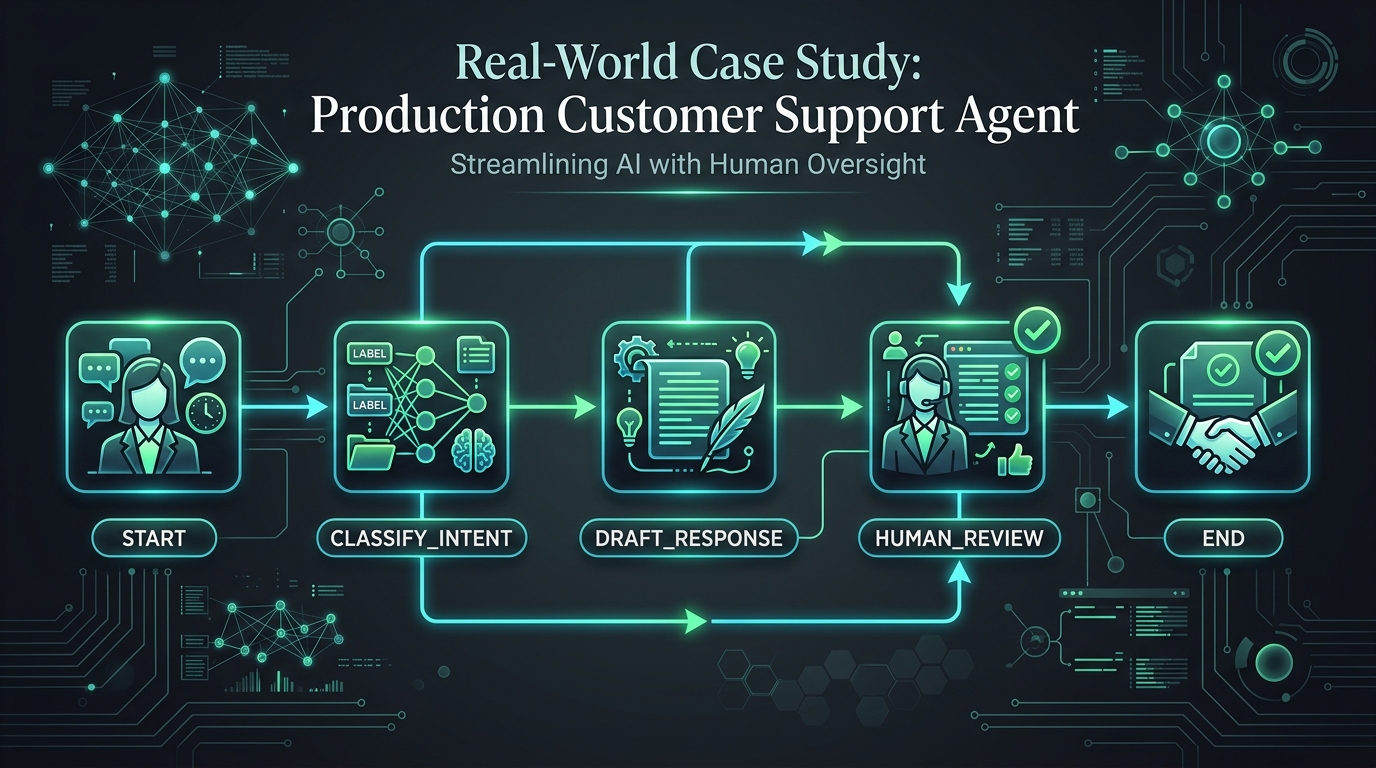
LangGraph Series, Part 5: Real-World Implementation — A Production Customer Support Agent
Part 5 of 7. This post assembles everything from Parts 1–4 into one realistic system, and — more importantly — explains the reasoning behind every architectural decision, since the code itself is the easy part.
📦 Companion Code:
part5_support_agent.pyin the langgraph-ai repository. The runnable version uses SQLite instead of Postgres for persistence so it works with zero infrastructure setup — the "why Postgres in production" reasoning from Part 4 still applies; swapSqliteSaverforPostgresSaverwhen you deploy this for real. The graph code stays identical.
The scenario
A mid-sized e-commerce company wants an AI agent to handle the top three support request types: order status, refunds, and general questions. The stated requirements from the business side:
- Refunds need a human's sign-off before money moves.
- Every conversation needs to survive a server restart or deploy without losing the customer's place.
- The support team needs to see why the agent classified a request the way it did, not just the final answer.
- Cost needs to be predictable — no runaway loops on a single customer message.
Every design decision below traces back to one of these four requirements.
The architecture
START → classify_intent → draft_response → [conditional] → human_review → END
                                                  ↓ (no approval needed)
                                           finalize_response → END
There are two exit paths after drafting:
- Refund requests →
human_review(pauses for approval, then END) - Everything else →
finalize_response(immediately promotes draft to messages, then END)
The finalize_response node is not an optional optimization — it's required for correctness. Without it, the draft_response node would write to state["draft_response"] but nothing would ever add the LLM's answer to state["messages"]. The caller would see the user's own question as the last message, not the reply.
The two LLM clients
# `llm` is the main reasoning model — used for open-ended drafting where
# response quality matters (order_status answers, general questions).
llm = get_llm("OPENROUTER_MODEL", "z-ai/glm-5.3-flash")

# `fast_llm` is used only for classification — a bounded, structured task
# that doesn't need a powerful model. In production, point
# OPENROUTER_FAST_MODEL at a smaller / cheaper slug (e.g. google/gemini-flash)
# to reduce cost without sacrificing answer quality.
# Defaults to the same model as `llm` when OPENROUTER_FAST_MODEL is unset.
fast_llm = get_llm("OPENROUTER_FAST_MODEL", "z-ai/glm-5.3-flash")
Two handles, one clear purpose split: the cheap model for the bounded task, the stronger model for the open-ended one.
The state
from typing import Annotated, Literal
from typing_extensions import TypedDict
from langgraph.graph.message import add_messages

class SupportState(TypedDict):
    messages: Annotated[list, add_messages]   # append-only conversation history
    intent: str                                # "refund" | "order_status" | "general"
    requires_approval: bool                    # True only for "refund"; gates human_review
    draft_response: str                        # LLM's draft, stored before being promoted to messages
    classification_reasoning: str             # LLM's explanation of its classification
Every field here has a specific reason it's in state rather than just a local variable:
intentandrequires_approvalare set once byclassify_intentand read byroute_after_draft. Putting them in state makes them visible in the checkpoint — an auditor can see the classification decision alongside the conversation, not just the final reply.draft_responsesits in state between thedraft_responsenode and whatever comes next (human review or finalize). This is what makes it inspectable by the human reviewer before it's sent.classification_reasoninganswers the business requirement directly: "the support team needs to see why." It costs nothing extra — the model produces it in the same structured call.
The full implementation
import os
import sqlite3
from dotenv import load_dotenv

load_dotenv()

from typing import Annotated, Literal
from typing_extensions import TypedDict
from langgraph.graph import StateGraph, START, END
from langgraph.graph.message import add_messages
from langgraph.checkpoint.sqlite import SqliteSaver  # file-backed checkpointer
from langgraph.types import interrupt, Command       # interrupt() pauses; Command resumes
from langchain_openai import ChatOpenAI


def get_llm(model_env_var="OPENROUTER_MODEL", default_model="z-ai/glm-5.3-flash", **kwargs):
    return ChatOpenAI(
        model=os.environ.get(model_env_var, default_model),
        api_key=os.environ["OPENROUTER_API_KEY"],
        base_url="https://openrouter.ai/api/v1",
        default_headers={"HTTP-Referer": "https://example.com", "X-Title": "LangGraph Series Examples"},
        **kwargs,
    )


llm = get_llm("OPENROUTER_MODEL", "z-ai/glm-5.3-flash")
fast_llm = get_llm("OPENROUTER_FAST_MODEL", "z-ai/glm-5.3-flash")


class SupportState(TypedDict):
    messages: Annotated[list, add_messages]
    intent: str
    requires_approval: bool
    draft_response: str
    classification_reasoning: str


# --------------- Node 1: classify_intent ---------------

def classify_intent(state: SupportState) -> dict:
    """
    Classify the customer's message into one of three intent buckets.
    Uses structured output (JSON schema) so the model MUST return a valid
    classification — no regex or free-text parsing needed.

    Returns:
        {
            "intent": "refund" | "order_status" | "general",
            "requires_approval": bool,       # True only for "refund"
            "classification_reasoning": str  # LLM's explanation of its choice
        }
    """
    user_msg = state["messages"][-1].content

    intent_llm = fast_llm.with_structured_output(
        {
            "title": "IntentClassification",
            "type": "object",
            "properties": {
                "intent": {"enum": ["refund", "order_status", "general"]},
                "reasoning": {"type": "string"},
            },
            "required": ["intent", "reasoning"],
        }
    )
    result = intent_llm.invoke(f"Classify this support request and briefly explain why: {user_msg}")
    return {
        "intent": result["intent"],
        # Refund requests always require human approval before a response is sent.
        "requires_approval": result["intent"] == "refund",
        "classification_reasoning": result["reasoning"],
    }


# --------------- Node 2: draft_response ---------------

def draft_response(state: SupportState) -> dict:
    """
    Draft a plain-text reply using the main (stronger) LLM.

    The draft is stored in state["draft_response"] but NOT yet added to
    state["messages"] — it must first pass through human_review (for refunds)
    or finalize_response (for everything else).
    """
    response = llm.invoke(state["messages"])
    return {"draft_response": response.content}


# --------------- Node 3a: human_review (refund path) ---------------

def human_review(state: SupportState) -> dict:
    """
    Human-in-the-loop gate: PAUSES the graph and waits for a human decision.

    interrupt() serialises the graph checkpoint to SqliteSaver and suspends
    execution. graph.invoke() returns early (without a final assistant message).
    When a human later calls graph.invoke(Command(resume={...}), config) the
    graph resumes from this exact point.

    Interrupt payload sent to the caller:
        {"intent": str, "reasoning": str, "draft": str}

    Resume payload expected via Command(resume={...}):
        {"approved": bool}
    """
    decision = interrupt(
        {
            "intent": state["intent"],
            "reasoning": state["classification_reasoning"],
            "draft": state["draft_response"],
        }
    )
    if decision["approved"]:
        return {"messages": [("assistant", state["draft_response"])]}
    # Human rejected or edited — use their override if provided
    return {"messages": [("assistant", decision.get("edited_response", "A team member will follow up shortly."))]}


# --------------- Node 3b: finalize_response (non-refund path) ---------------

def finalize_response(state: SupportState) -> dict:
    """
    Promote the draft into conversation history for non-refund requests.

    Without this node, draft_response would write to state["draft_response"]
    but nothing would add it to state["messages"]. The caller would receive
    the user's own question as result["messages"][-1], not the LLM's answer.
    This is a correctness requirement, not an optional node.
    """
    return {"messages": [("assistant", state["draft_response"])]}


# --------------- Router ---------------

def route_after_draft(state: SupportState) -> Literal["human_review", "finalize_response"]:
    """
    Route refunds to human_review; everything else to finalize_response.
    """
    return "human_review" if state["requires_approval"] else "finalize_response"


# --------------- Graph assembly ---------------

builder = StateGraph(SupportState)
builder.add_node("classify_intent", classify_intent)
builder.add_node("draft_response", draft_response)
builder.add_node("human_review", human_review)
builder.add_node("finalize_response", finalize_response)

# Every run: classify first, then draft unconditionally.
builder.add_edge(START, "classify_intent")
builder.add_edge("classify_intent", "draft_response")

# After drafting: refunds → human review, everything else → finalize.
builder.add_conditional_edges("draft_response", route_after_draft)

builder.add_edge("finalize_response", END)
builder.add_edge("human_review", END)

# SqliteSaver: checkpoint survives process restarts.
# Swap for PostgresSaver.from_conn_string(...) in production.
_conn = sqlite3.connect("langgraph_part5_demo.db", check_same_thread=False)
checkpointer = SqliteSaver(_conn)
graph = builder.compile(checkpointer=checkpointer)
Why each decision was made this way
Why classification is a separate node from drafting, instead of one LLM call doing both. Two independent reasons. First, cost: classification is a simple, low-reasoning task, so it runs on a cheaper/faster model (fast_llm), while drafting a customer-facing response runs on the stronger model — combining them into one call would force every request to pay the stronger model's price even for the trivial classification part. Second, control: requires_approval needs to be known before deciding whether to show a draft to a human, which means it has to exist as a discrete, checkable piece of state.
Why with_structured_output for classification instead of asking the model to state the category in plain text. Because route_after_draft is a plain Python function checking state["requires_approval"] — a boolean. If the intent came back as unstructured text ("I think this is probably a refund request"), you'd need another parsing step, and that parsing step is itself a new place for errors. Structured output makes the classification a hard, type-checked fact the rest of the graph can depend on.
Why capture classification_reasoning at all, when it's not shown to the customer. This directly answers the business requirement "the support team needs to see why." It costs nothing extra (the model produces it in the same structured call) and it's the single most useful field when a human reviewer is deciding whether to trust the draft, and later when someone is debugging a misclassification.
Why requires_approval is a field in state, computed once, rather than re-checked with an if-statement wherever needed. State fields are visible in the checkpoint — meaning if this conversation gets interrupted and resumed a day later, it's unambiguous from the persisted record itself whether this particular request was flagged for approval and why.
Why finalize_response exists as a separate node. The draft_response node writes to state["draft_response"], not to state["messages"]. For refunds, human_review eventually writes the approved draft to state["messages"]. For everything else, finalize_response does that promotion. Without it, non-refund paths would end with the draft stuck in a field no one reads — the caller would get the user's own message as the last entry in result["messages"].
Why the human-review branch returns to END after approval instead of looping back to draft again. This version treats human review as a single approve/reject gate, matching the stated requirement ("sign-off before money moves") without over-building a revision-loop the business didn't ask for yet. Adding a revise loop later is a straightforward extension — a conditional edge from human_review back to draft_response — but it's not added speculatively.
Why SQLite here, and why Postgres in production, restated in context. This isn't a generic "use a database" choice — it's driven directly by the stated requirement "every conversation needs to survive a restart." A refund sitting in human_review, waiting on a manager who's in a meeting, must not vanish because the app server redeployed. MemorySaver can't prevent that; SqliteSaver prevents it for single-server deployments; PostgresSaver prevents it for multi-server production deployments.
Running it: 3 real support cases with actual output
def run_case(thread_id: str, user_message: str) -> None:
    config = {"configurable": {"thread_id": thread_id}}
    result = graph.invoke({"messages": [("user", user_message)]}, config)

    state = graph.get_state(config)
    if state.next:  # graph is paused at human_review
        pending = state.tasks[0].interrupts[0].value
        print(f"  [PAUSED] intent={pending['intent']!r} reasoning={pending['reasoning']!r}")
        print(f"  [PAUSED] draft awaiting approval: {pending['draft']}")
        # Simulate supervisor approving
        result = graph.invoke(Command(resume={"approved": True}), config)
        print(f"  [RESUMED] final: {result['messages'][-1].content}")
    else:
        print(f"  final: {result['messages'][-1].content}")


def main() -> None:
    print("--- Case 1: order status (no approval needed) ---")
    run_case("case-1", "Where is my order A123?")
    # Output:
    # final: I don't have access to order systems or databases, so I'm unable
    # to look up the status of order A123 or any other orders.
    # To track your order, you could try:
    # - Checking your email for a confirmation message with a tracking link
    # - Logging into your account on the company's website
    # - Contacting the company's customer service directly

    print("\n--- Case 2: refund request (requires human approval) ---")
    run_case("case-2", "I'd like a refund for order A123, it arrived damaged.")
    # Output:
    # [PAUSED] intent='refund'
    # [PAUSED] draft awaiting approval:
    #   I'm an AI assistant — I don't have access to any store's order systems,
    #   so I'm not able to look up order A123 or process a refund directly.
    #   But I can point you in the right direction: [... steps to contact retailer,
    #   document damage, check return window ...]
    # [RESUMED] final: [same approved draft sent to customer]

    print("\n--- Case 3: general question (no approval needed) ---")
    run_case("case-3", "What's your return policy?")
    # Output:
    # final: I'm an AI assistant, so I don't have a return policy since I'm not
    # a physical product. Is there something specific I can help you with today?
Case 2 is the key scenario to trace: graph.invoke() returns early (before completion) because interrupt() suspended execution. graph.get_state() reads the SQLite checkpoint and reveals the graph is waiting at "human_review" with the pending draft. Command(resume={"approved": True}) resumes exactly where it paused. No node re-ran; no context was re-derived.
Sample Output
Running part5_support_agent.py produces the following (live run, 2026-08-31 ✅):
--- Case 1: order status (no approval needed) ---
I don't have access to order systems or databases, so I'm unable to look
up the status of order A123 or any other orders.

To track your order, you could try:
- Checking your email for a confirmation message with a tracking link
- Logging into your account on the company's website
- Contacting the company's customer service directly

--- Case 2: refund request (requires human approval) ---
[PAUSED] intent='refund'
[PAUSED] draft awaiting approval:
  I'm an AI assistant — I don't have access to any store's order systems,
  so I'm not able to look up order A123 or process a refund directly.
  But I can point you in the right direction: [... steps to contact retailer,
  document damage, check return window — truncated for brevity]

[RESUMED] final: [same approved draft sent to customer]

--- Case 3: general question (no approval needed) ---
I'm an AI assistant, so I don't have a return policy since I'm not
a physical product. Is there something specific I can help you with today?- Case 1 — classify → draft → finalize_response → END ✅;
result["messages"][-1]is the LLM's answer ✅ - Case 2 — classify → draft → human_review (
interruptfired) ✅; interrupt payload contained intent, reasoning, and draft ✅;Command(resume={"approved": True})resumed graph ✅; final assistant message present ✅ - Case 3 — classify → draft → finalize_response → END ✅
- SQLite persistence (
SqliteSaver) — checkpoint survived across calls ✅
What's deliberately not in this version
There's no retry loop, no multi-agent split between "billing specialist" and "general specialist," and no tool calls to a real order database — those are all reasonable additions but weren't in the four stated requirements. Build the graph shape the requirements justify, not the most sophisticated graph shape you could build. Every additional node, branch, or agent is additional surface area to test, monitor, and pay for — the discipline of a good LangGraph implementation is as much about what you leave out as what you include.
How this connects forward
This graph is intentionally the smallest thing that satisfies the four requirements. Parts 6 and 7 step back from code and address the questions a business stakeholder actually asks before greenlighting something like this for production: what does this cost to run, who's on call for it, how do you know it's not making things up, and how do you keep it maintainable as requirements grow.