Why LangGraph Exists (And Why Not Something Simpler)
Every framework exists because something simpler broke down. Understand exactly which wall you hit that makes a graph-based approach worth the complexity — and when you don't need it at all.
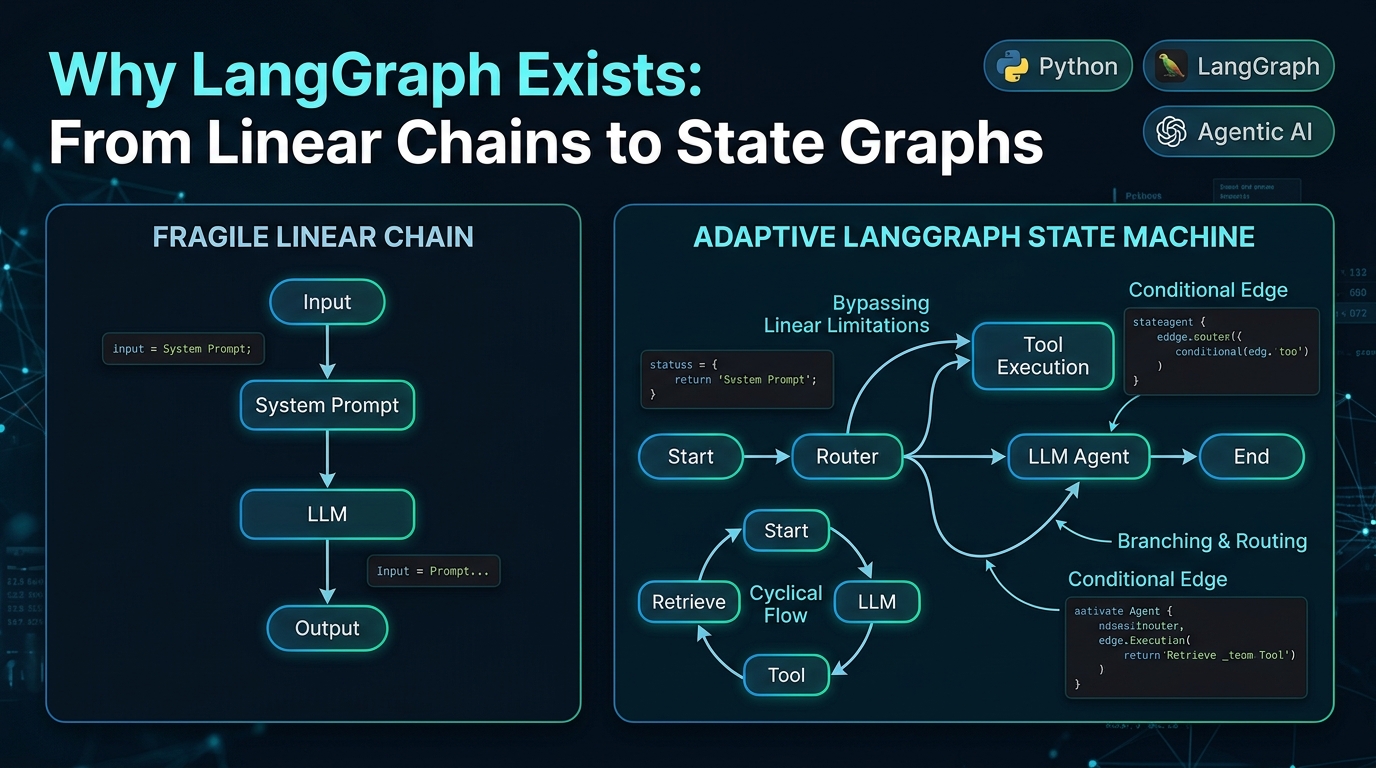
LangGraph Series, Part 1: Why LangGraph Exists (And Why Not Something Simpler)
Part 1 of 7 in LangGraph: From Basics to Business — this post covers the problem LangGraph solves and why it beats the obvious alternatives. Later parts build up to a full production implementation and a business playbook.
Every framework exists because something simpler broke down at scale. Before you write a single line of LangGraph code, it's worth understanding exactly which wall you hit that makes a graph-based approach worth the extra complexity — because if you haven't hit that wall yet, you don't need it, and adding it anyway is pure overhead.
This post is entirely about the "why," not the "how." The how starts in Part 2.
The problem: real workflows aren't straight lines
A basic LLM call looks like this:
input → prompt → LLM → outputThis is a directed line. It works beautifully for summarization, classification, translation, simple Q&A — anything where one pass through the model is enough.
The moment your use case needs any of the following, a straight line stops being able to express it:
- Looping: "keep searching / calling tools until you have enough information to answer"
- Branching on a decision: "if the question is about billing, go one way; if it's technical, go another"
- Retrying with correction: "if the output fails validation, send it back to be fixed, up to 3 times"
- Waiting on a human: "pause here until a manager approves this refund, which might take five minutes or two days"
- Multiple specialists collaborating: "have a researcher agent gather facts, then a writer agent draft, then a critic agent review"
None of these fit on a straight line. They're flowcharts — nodes with arrows, some of which loop back, some of which branch based on conditions. LangGraph is, quite literally, a library for building and running that flowchart, where each box in the flowchart can contain an LLM call, a tool call, a database query, or even a whole other flowchart.
Why not just write the control flow yourself in Python?
This is the first fair question, and for small projects, the honest answer is: you don't need LangGraph, just write a while loop. A simple agent loop can be 30 lines of plain Python:
messages = [user_input]
for _ in range(max_iterations):
    response = llm_with_tools.invoke(messages)
    messages.append(response)
    if not response.tool_calls:
        break
    for call in response.tool_calls:
        result = execute_tool(call)
        messages.append(result)
This works, and plenty of production systems are exactly this. So why reach for a framework at all?
The honest reasons LangGraph starts paying for itself, roughly in the order teams hit them:
- You need to pause and resume. The moment you need a human-approval step that might not resolve for hours, "just a for-loop" doesn't work — you'd have to build your own state serialization, storage, and resumption logic. LangGraph's checkpointing does this for you (covered in Part 4).
- You need more than one branch of logic, and the branches themselves have sub-branches. Hand-written control flow for this turns into deeply nested if/else blocks that are hard to read, test, or hand off to a teammate. A graph makes the branching structure visible and inspectable rather than buried in code.
- You need multiple agents that hand off to each other. Coordinating this by hand means manually managing whose turn it is, what each agent can see, and how control returns — LangGraph's subgraph and supervisor patterns give you this structure for free (Part 4).
- You want built-in observability. Because the graph structure is explicit, tools like LangSmith can show you exactly which node ran, in what order, with what state — vs. a hand-rolled loop where you're adding print statements or custom logging everywhere.
- You want to swap or test one step without touching the rest. Nodes are just functions with a defined input/output contract (the state), so replacing "the retrieval step" doesn't require you to understand or re-test the whole pipeline.
None of these needs are hypothetical — they're the specific reasons teams migrate from "big while loop" to LangGraph. If your project genuinely has none of them, stay with the while loop. Simpler is better until it isn't.
Why LangGraph specifically, vs. CrewAI, AutoGen, or a pure orchestration DSL?
This is the second fair question, since LangGraph isn't the only agent framework. Here's the actual trade-off, not a marketing comparison:
CrewAI optimizes for a specific mental model: a "crew" of role-based agents (e.g., researcher, writer, editor) that pass work between each other in a mostly sequential or hierarchical process. It's faster to get started with if your workflow genuinely maps to "a team of role-based agents doing a project," and it hides more of the plumbing. The trade-off: when your actual logic needs a more irregular shape — specific conditional branches, mid-flow human approval, fine-grained control over exactly what each step can see — you end up fighting the abstraction to bend it into that shape.
AutoGen (Microsoft) optimizes for open-ended multi-agent conversation — agents that talk to each other somewhat freely to solve a problem, which is powerful for research and exploratory tasks but harder to make deterministic and auditable, which matters a lot for business-critical workflows (a refund process shouldn't have "somewhat unpredictable" as a property).
LangGraph optimizes for explicit control over an arbitrary graph shape, with first-class support for state persistence and human-in-the-loop. It's lower-level than CrewAI — you're defining nodes and edges yourself rather than getting a pre-built "crew" abstraction — which means more code upfront, but also means you're not fighting the framework when your workflow doesn't match its built-in assumptions. It's a deliberate trade of "faster to prototype" for "easier to make precise, testable, and auditable."
The decision rule that actually matters: if your workflow can be described as "a fixed team of agents doing a mostly linear project," CrewAI will get you there faster. If your workflow has real branching, needs to pause for a human, needs a strict audit trail of exactly what happened and why, or doesn't fit a "team" metaphor at all (e.g., it's really a state machine — order → validate → route → maybe-refund → notify), LangGraph's lower-level control is worth the extra code. Most workflows that touch real business processes (money, customer data, compliance) end up needing that precision, which is why LangGraph tends to win once a prototype becomes a product.
Why a graph abstraction specifically, and not just "an agent with more tools"
There's a simpler-sounding alternative: give one LLM a big toolbox and let it decide everything, in a single loop, with no explicit graph structure. Why is that not enough?
Because as the number of possible steps grows, letting a single LLM call implicitly decide "what happens next" via free-form reasoning has three costs:
- Predictability drops. The same input can take a different path than you expect, because the "control flow" lives inside the model's reasoning rather than in code you can read.
- You lose the ability to force certain steps. You can't guarantee "a human must approve refunds over $500" if the LLM itself is deciding whether to call the approval step — it might skip it. In a graph, you make that edge non-optional in your code.
- Debugging becomes archaeology. When something goes wrong, you're reading through a transcript trying to reconstruct why the model chose a path, instead of looking at a state trace across explicit, named nodes.
The graph doesn't remove the LLM's reasoning — nodes still call the LLM to decide things — but it puts hard boundaries around where that reasoning is allowed to change the outcome, and where the business logic is fixed regardless of what the model "wants" to do. That distinction — LLM reasoning inside guardrails you define — is the core value proposition, and it's exactly what business stakeholders should care about when they hear "we're building this on an agent framework."
What's next
Part 2 gets hands-on: State, Nodes, Edges, and reducers — the actual building blocks — with a basic chatbot example, and an explanation of why LangGraph's state-passing model looks the way it does (and what breaks if you get it wrong).